Rooting and Debloating a TCL 55C641K Android TV
How I used ADB, community firmware and Magisk to debloat and root my TCL 55C641K Android TV, including an unexpected reboot loop and how I investigated it.
My TCL 55C641K was doing more in the background than I needed it to. I mainly use the television with external devices, including a Virgin Media 360 box and an Nvidia Shield, yet Android TV was still running TCL services, recommendations, voice features and apps I rarely touched.
I started with a fairly modest plan: connect over ADB, remove the unnecessary packages and see whether that made the TV easier to live with. Two days later, I had worked through a firmware hunt, flashed a community-modified Android TV build, installed Magisk and chased down a reboot loop.
This is how that project unfolded, including the parts that didn't go to plan.
Starting with what was actually running
The first thing I did was audit the TV rather than start removing packages at random. The important details were:
| Original configuration | |
|---|---|
| Model | TCL 55C641K |
| Platform | Realtek RTD2851M, TCL R51M / R51MT02 |
| Android | Android TV 11 |
| Firmware | V8-R51MT02-LF1V342 |
| Security patch | 5 June 2022 |
| Memory | 2 GB RAM |
| Installed packages | 140 |
I used Windows PowerShell 5.1 and network ADB from my PC. A few useful read-only commands were:
adb connect TV_IP:5555
adb shell getprop ro.software.version_id
adb shell getprop ro.build.fingerprint
adb shell getprop ro.build.version.security_patch
adb shell pm list packages
adb shell cat /proc/meminfo
The package list included TCL telemetry, promotional services, screen-sharing components, Google voice features and several Freeview-related applications. Not everything unfamiliar was expendable: HDMI input, the launcher, system settings and remote-control services were all things I wanted to preserve.
One early finding was easy to misread. Linux reported a load average of around 27 on a four-core TV, which sounds disastrous. But top showed roughly 93% CPU idle. A closer look found Realtek kernel threads sitting in uninterruptible sleep, inflating the load average. It wasn't evidence of four overloaded cores.
I turned my attention to memory, although it was harder to measure cleanly. I initially overestimated how much RAM unwanted apps consumed by adding up their RSS figures; that double-counts shared memory. dumpsys meminfo gave a more useful picture using proportional set size (PSS).
Debloating over ADB: useful, until the next reboot
I first tried the least invasive approach. Android lets you uninstall a system app for the current user without removing its APK from the system partition. For example:
adb shell pm uninstall --user 0 com.tcl.bi
That removes TCL's com.tcl.bi package for user 0. If you need it back, Android can reinstate the system copy:
adb shell cmd package install-existing com.tcl.bi
I worked in batches rather than running one enormous debloat command. Claude Code helped generate PowerShell scripts that recorded each removal, produced restore scripts and checked that key TV packages were still present after a reboot. I ran the commands and checked the TV myself between batches.
Across the initial batches, I removed 56 packages. I also set the Android animation scales to 0.5×, switched to Gboard and disabled Wi-Fi because the television was already connected over Ethernet.
The problem appeared when I checked the removals again: 17 packages had returned after warm ADB reboots. They included TCL extras, Freeview components, TV recommendations and the TCL keyboard. Disabling those packages didn't solve it either; all 17 were enabled again after subsequent reboots.
I could see hints of TCL's updater and Google Play being involved, but I didn't establish the exact reinstall mechanism. More importantly, the result was clear enough for my purposes: the non-root changes weren't persisting reliably.
The memory readings weren't a simple victory either. Available RAM didn't consistently increase during this phase. Swap use fell from around 262 MB to 17 MB, but those readings alone can't establish exactly what caused the change.
So the ADB experiment taught me what I could safely remove, but it wasn't going to be my final setup.
Finding firmware that actually matched the TV
Rooting meant taking on a much bigger risk: flashing firmware. With TCL televisions, the marketing model number alone isn't enough to establish compatibility. The platform and build metadata matter.
My TV identified itself as R51MT02, with the BeyondTV6 product and BeyondTV4 device identifiers. I looked through the 4PDA R51M community discussion, along with firmware mirrors and a Telegram firmware bot.
Two official-style OTA archives came up during the search:
- V903 matched the TV's
BeyondTV6product line. - V923 reported
BeyondTV7, so I decided against using it even though the filenames looked closely related.
I downloaded and checked both stock OTA files, but didn't install either one. What I eventually used was a pair of community-modified builds published by a 4PDA contributor known as Face_ltd:
- ATV344 Lite — a full
Update.img, with a Magisk-patched boot image. - ATV903 Lite — a follow-up custom OTA that retained root and moved the TV to V903.
The custom V903 OTA even used the filename V8-R51MT02-LF1V903.zip, just like the stock download, despite being a different file. Comparing sizes and reading the OTA metadata helped prevent me from treating them as interchangeable.
Obtaining the archives was its own headache. Yandex Disk would return file metadata while downloads stalled, during a period when Yandex was reporting service disruption. I eventually retrieved the files from the available mirrors. Their checksums matched the Yandex collection's records, which was useful for checking transfer integrity, not an independent guarantee that community firmware was safe.
Before flashing, I also extracted the Realtek installer's config.txt from Update.img. This was the most important risk check. It showed that impdata, persist and rtdata were marked to be skipped, but that the bootloader, system partitions, tclconfig and factory-related areas would be written. The real /data partition would be reset as well.
That mattered because impdata contains unit-specific information such as keys and identifiers. The installer rules were reassuring in one respect, but they didn't make the flash risk-free. I had no pre-flash partition images and no tested route back to the exact factory configuration.
Flashing ATV344 Lite, then ATV903 Lite
I put the ATV344 Lite Update.img on a FAT32 USB stick, checked the copy and used the TV's USB recovery process with the underside power button. The screen displayed the firmware update message, then rebooted into a fresh setup with a different TCL boot animation.
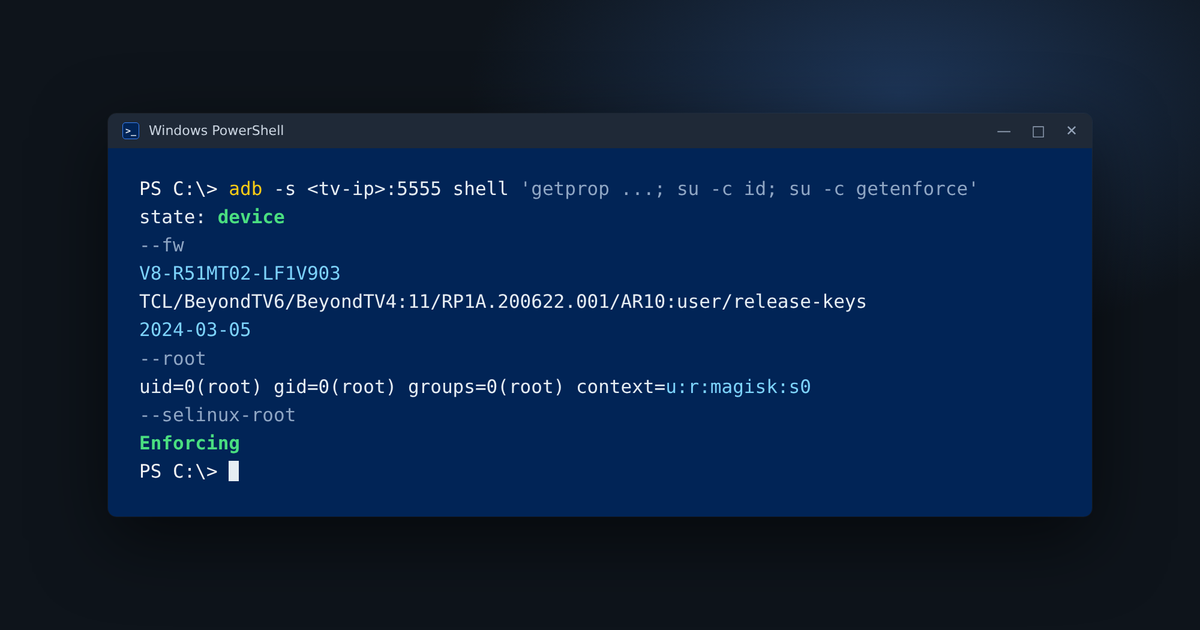
After setup, I installed Magisk 29, completed its additional setup and authorised the ADB shell for root access. The result was unambiguous:
$ adb shell su -c id
uid=0(root) gid=0(root) groups=0(root) context=u:r:magisk:s0
HDMI picture, sound and the remote's Home button worked after that first flash.
Next came the ATV903 Lite OTA, installed through the same USB update process. This one kept /data, so I didn't have to go through setup again, and Magisk root carried over. Android still reported version 11, but the firmware was now V903 (AR10) with a 5 March 2024 security patch.
There was an important consequence: the full IMG flash had wiped my earlier per-user ADB removals. That original debloat work was an experiment, not part of the final package reduction. Most of the eventual reduction came from the Lite firmware itself.
A small Magisk module for the remaining apps
With root available, I could deal with system apps that remained in the new firmware. Rather than modify /system directly, I built a systemless Magisk module.
Magisk's .replace mechanism lets a module present an empty directory over a real system app directory at boot. The underlying files stay on the partition, which means the module can be disabled without permanently deleting them.
A few entries from my module show the idea:
system/
├── priv-app/
│   ├── Katniss/.replace
│   └── AndroidMediaShell/.replace
└── product/app/
    └── TCL_ALL_BI/.replace
Those entries hide Google voice search, Chromecast built-in and TCL's telemetry package. The complete v1.1 module hid 11 app directories, including features I wasn't using such as Miracast and TCL promotional components. I left core TV services, the launcher and TCL's WebView alone.
The final check was more than a script printing “removed”. I verified that ADB was connected, that the TV had a sensible total package count, that the module was enabled and that all 11 targeted packages were absent from the active package list.
Unfortunately, getting to that final state involved one unpleasant detour.
The reboot loop: the obvious suspect was wrong
After installing my first module, v1.0, the TV began restarting roughly every 88 seconds. It would reach the home screen, show HDMI playback and then reboot without warning.
My first thought was the module. Version 1.0 also hid TCL's WebView, so I suspected I'd removed something another system component depended on. I built a revised module that kept WebView — but I didn't install it immediately. First, I disabled the Magisk module entirely.
The reboots continued.
That test changed the direction of the investigation. If the TV was still restarting with the module disabled, I needed to look elsewhere. I captured logcat from the moment ADB reconnected until the next restart. The essential command was:
adb logcat -b all -v time > bootlog.txt
The logs showed TCL Guard (com.tcl.guard) starting early in boot. Its memory-management component was killing Google Play Services processes and attempting to stop another TCL service. I also found a warning in the community firmware instructions about TGuard and repeated reboots.
With the module still disabled, I disabled and uninstalled TGuard. The repeated reboots stopped. Only after that did I install the revised module v1.1.
I can't point to a single log line saying “TGuard caused reboot”. The captured log ends before such a reason appears. But the combination of its behaviour, the firmware author's warning and the stable boot after removal makes it the strongest explanation. Just as importantly, the module had been ruled out as the necessary trigger.
The surprise in Magisk's startup scripts
While investigating TGuard, I found another feature I wasn't comfortable leaving enabled: /data/adb/service.d/pkgs.sh.
This script ran through Magisk at boot. It waited a minute, then repeatedly looked for APKs under Download/install and passed them to Android's package manager using a root-run shell. In other words, it provided a way for files placed in shared storage to be installed without going through the normal interactive installation flow.
The firmware's documentation described a package-installation feature, and the script's timestamps lined up with the custom OTA. I couldn't establish every step of how its bundled applications were staged, but I could see what the script itself did.
I removed the unwanted bundled apps, saved a copy of pkgs.sh and removed the active startup script. That was a security clean-up, not the reboot fix: the TV had already passed a cold-boot check before I removed it.
A later test provided a better result. After a cold start, the TV stayed running for 66 minutes, including roughly an hour of football through my Virgin Media 360 at 3840 × 2160, 50 Hz, with no spontaneous reboots.
Backups and the final result
Once root was working, I backed up the available unit-specific partitions, selected system partitions and eMMC boot areas to my PC. The images matched their expected sizes, and I generated checksums for the copies. The files contain sensitive device-specific information, so I keep them private.
There is a limitation I wouldn't gloss over: those backups were made after the firmware flash. They're useful for protecting the current state, but I can't use them to restore the exact original V342 configuration, and I haven't tested a restore. The post-flash impdata metadata matched my earlier file listing, which is encouraging, but isn't the same as having a pre-flash image for comparison.
At the end of the project, the TV was running:
| Final state | |
|---|---|
| Firmware | ATV903 Lite, Android TV 11 |
| Root | Magisk 29; SELinux Enforcing |
| Packages | 76 visible packages, including 3 user apps |
| Magisk module | v1.1; 11 system app directories hidden |
| TGuard / packet installer | Removed / absent |
| HDMI test | Virgin Media 360, 4K/50 Hz, stable for the observed session |
For perspective, the move from 140 to 76 packages wasn't the result of 64 manual removals. The Lite firmware omitted 55 packages found in the original build, added five, and I then uninstalled three and hid another 11 through Magisk.
The final memory snapshot showed roughly 638 MB available and 5 MB of swap in use after 66 minutes. That's an observation, not a controlled performance comparison with stock firmware. I also haven't verified Dolby Vision, HDR10+, Widevine L1 playback or the Xbox's gaming features on the new build, so I'm not claiming those survived unchanged.
The TV reports a locked bootloader and a green verified-boot state even with the modified firmware. I didn't unlock the bootloader, but those reported values alone don't explain how the custom boot image is trusted.
What I'd take from the project
The main lesson wasn't that rooting is always better than ADB debloating. It was that the simplest change that persists is usually the right place to stop. My first ADB changes were reversible, but some didn't survive a reboot; flashing custom firmware solved one set of problems while introducing very different risks.
A few habits proved useful throughout:
- Identify the platform before choosing firmware.
BeyondTV6versusBeyondTV7mattered more than a similar-looking ZIP filename. - Keep an undo route for changes you control. Batch restore scripts and a systemless module helped; a full firmware image was a different story.
- Change one thing at a time when debugging. Disabling the module before blaming it was the turning point in the reboot investigation.
- Read what runs at boot. The package-installer script was easy to overlook and worth removing from my setup.
- Don't confuse a promising number with a benchmark. Package counts, available RAM and load average all needed context.
I'm happy with the resulting setup as a TV that primarily serves my external devices, with fewer unused Android components and a working root environment when I need it. It remains community firmware with real recovery and security trade-offs, not something I'd recommend flashing blindly to every C641K.
For anyone considering the same route, start by reading the Android ADB documentation, the Magisk module guide and the R51M community thread. Match your own firmware and hardware before acting. A rooted TV also deserves the same access-control discipline as any other device on the network; I've covered that broader approach in Security and Access Control in a Homelab.
One final housekeeping item for my own setup: at the time of the last verification, network ADB was still enabled and Magisk had a standing Shell root grant. Those should be disabled or revoked when remote administration is no longer needed.
Update (1 November 2026): I later moved the TV to TCL's Google TV V652 firmware, rooted it with Magisk and carried out further debloating and memory tests. Read Part 2: Rooting Google TV on a TCL That Never Got It.