Rooting Google TV on a TCL That Never Got It
My TCL ran Android TV, and TCL never offered it Google TV. I checked a UK Google TV build offline, rooted it with Magisk, hit a reboot loop, and used a control flash to narrow it down.
My TCL 55C641K now runs a rooted UK Google TV build that TCL never offered it. A week after rooting and debloating it on Android TV, I moved it to TCL's own Google TV firmware for a sister platform, rooted that with Magisk, and stripped out most of TCL's software.
It didn't work first time. The first rooted image rebooted the TV within two minutes of every boot. A control flash and a byte-for-byte comparison told me what wasn't the cause, and a small change to the installer's rules got me the logs and the root shell. This post covers what I checked before flashing, what went wrong, and what I could prove at the end.
TL;DR
| Before | After | |
|---|---|---|
| Firmware | ATV903 Lite (Android TV 11, custom build) | TCL V652 Google TV, UK build G03_4K_GB (Android 11) |
| Security patch | March 2024 | December 2024 |
| Root | Magisk 29, SELinux Enforcing | Magisk 29, SELinux Enforcing |
| TCL and promo apps | Partly hidden | 42 system apps hidden by a Magisk module; only TCL's "TV" app left on screen |
| Memory in use (idle, RAM + swap) | Not measured | About 77 MB less with the debloat than without it |
| Picture settings | Tuned per input | Survived both flashes untouched |
| Power on to last input | Reverted, untested | Working and tested |
The usual warning applies, more than it did last time. This was a modified image of firmware meant for a different platform ID, flashed by hand. I checked a lot before flashing, but it could have bricked the TV.
Why move a working TV to Google TV at all
Part 1 ended with a stable, rooted Android TV build. The weak point was software age: ATV903 Lite carries a March 2024 security patch, and the newest stock builds I'd found for my platform were from 2024.
My Nvidia Shield does all the apps, so Google TV's interface wasn't the draw. The draws were a newer patch level on a networked device, and a fair question: could a TV that TCL left on Android TV run its Google TV software properly?
The trigger was a post in the TCL Android TV updates Telegram group announcing V652, a Google TV build for the R51MT05 platform, with C64x models in its list. My TV identifies as R51MT02. It has the same Realtek chip family but a different firmware branch. That's why the TV's own update check never offered it.
Checking the image before it went anywhere near the TV
I didn't flash anything until I'd taken the image apart on the PC. A TCL firmware is generic: at boot, the TV reads its project ID from the factory area and picks two profile files. One is a hardware profile (panel, backlight, amplifier, HDMI EDIDs); the other is a software profile (region, tuners, default settings). So the question wasn't "is this my model's firmware?" It was "does it contain my profiles, and will it leave my factory data alone?"
The full image (Update.img, 3,925,780,480 bytes) is a plain GNU tar. I hashed it, listed it, extracted the small files, then pulled out vendor.img in pieces to read the hardware profiles.
| Check | What I found |
|---|---|
| Build | TCL/G03_4K_GB/BeyondTV4:11, security patch 2024-12-05: a GB (UK) build |
| Software profile | SID_EU_21_4K_UK present, the same one my TV uses now |
| Hardware profile | HID_55_15_4K_EU_55C635 present and identical to my TV's file, apart from a trailing newline. All 13 files it references are there, including the panel, backlight and Dolby Vision EDIDs |
| Features | VRR, DLG and AdaptiveVolume listed as supported. The Lite builds had to switch these on by hand |
| Install rules | config.txt byte-identical to the ATV344 Lite image I'd already flashed |
| Signing | Package signature field empty; vbmeta signed with the same TCL key as my V903 firmware |
The install rules mattered most. Like ATV344 Lite, the image writes the bootloader and factory, but ifcmd2 keeps a list of panel files, and impdata, persist, rtdata and userdata are marked skip_upgrade. The matching preservation rules gave me some reassurance, but they didn't remove the risk of flashing firmware built for a different platform ID.
One caveat stays: my TV's mapping from project ID to profile 15 is inferred. I matched the profile; I didn't read the mapping directly.
Building a rooted image, and what the Lite build gave away
Before patching anything, I wanted to know exactly how the Lite builder had rooted the same kind of image. So I pulled the boot images out of the ATV344 Lite image and the stock V903 firmware, and compared them with Magisk's own magiskboot.
- The stock boot image has no ramdisk.
- The Lite one has a Magisk ramdisk, and its kernel has the standard
skip_initramfs→want_initramfspatch. - The Lite ramdisk's
init,magisk,init-ldand stub files have the same SHA1 hashes as the 32-bit ARM files in the Magisk v29 APK. In other words, it's unmodified Magisk, applied the standard way.
The vbmeta images had a surprise. All three (Lite, stock V903 and V652) are signed with the same TCL key and have flags 0, so verification is not switched off. Yet in the Lite image, vbmeta's recorded hash for the boot partition does not match its patched boot image, and that firmware booted and reported green / locked. Part 1 listed this as unexplained. The successful boot shows that this hash mismatch didn't stop the TV starting, but I haven't verified precisely what the bootloader enforces or why.
So I patched V652's boot image the same way. Its new ramdisk came out at 300,740 bytes, the same size as the Lite one. The patched image is still exactly 32 MiB, which meant I didn't need to rebuild the 3.9 GB tar. A small PowerShell script found the package7/boot.img entry by walking the tar headers, checked the stock bytes' hash, overwrote them in a copy of Update.img, and read the result back. Every header and every other file stayed byte-identical.
The reboot loop, and a control flash to find its cause
The first flash went well. I started at 21:57, saw the stock red TCL logo at 22:00 and the Google TV animation at 22:01, and reached the welcome screen at 22:04. TCL's TV service even started playing the Virgin box's sound from HDMI 2 behind the setup screen, because it was reading my old settings data.
Then the TV rebooted, with the red TCL logo, so it was a full restart, not an app crash. It did the same three times, each within about two minutes of reaching setup. The first time I'd plugged in Ethernet mid-setup, so I blamed that. The third time no cable was connected at all.
I couldn't get logs. The flash wipes /data, which took network ADB and my PC's authorisation with it, and the TV never stayed up long enough to switch them back on.
So I changed one variable. I flashed the original, unrooted Update.img: the same firmware, minus my patched boot image.
- If it crashed too, the problem was V652 on this TV, perhaps the old settings data it keeps.
- If it stayed up, the problem was root.
It stayed up. It went through the whole Google TV setup, sign-in and app downloads, with 41 minutes of uptime when I checked, and no crash entries in the boot history.
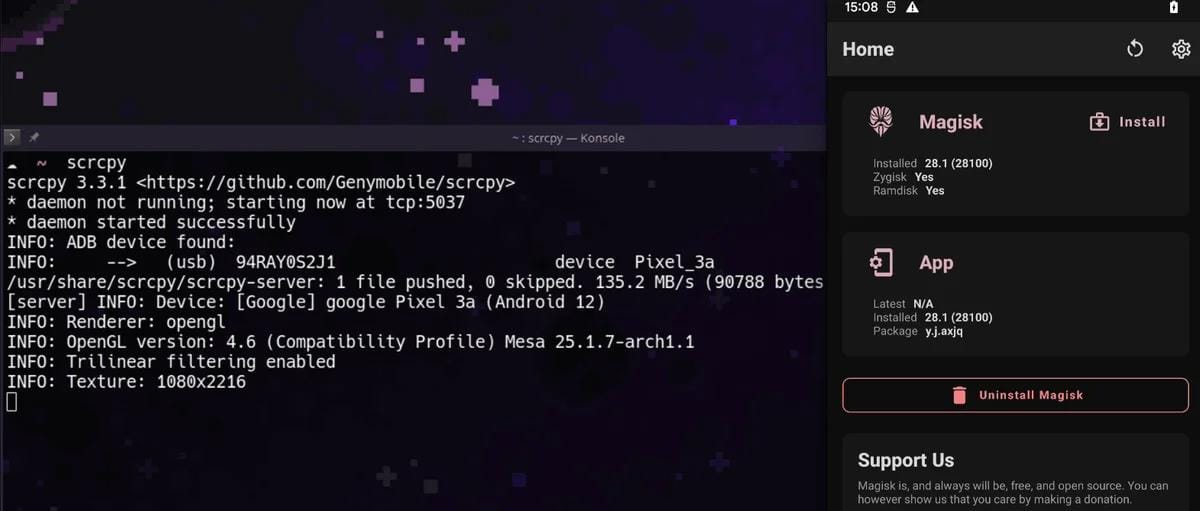
The obvious next suspect was my patch. I'd copied two settings from the Lite build's Magisk config: Recovery Mode on, and mmcblk0p17 as the pre-init partition. So I had Magisk patch the stock boot image on the TV itself. Google TV has no file picker for the Magisk app's "Select and Patch a File", so I pushed Magisk v29's own boot_patch.sh and binaries over ADB and ran it as the shell user.
LEGACYSAR=true RECOVERYMODE=true
- Pre-init storage partition: mmcblk0p17
Patch @ 0x015AB822 [736B69705F696E697472616D667300] -> [77616E745F696E697472616D667300]
Magisk chose exactly what I'd chosen. And the output matched mine byte for byte:
| Boot image | SHA256 |
|---|---|
| Patched by Magisk on the TV | C044FAD5…457B4ED4 |
| Patched off-device using magiskboot (Linux workspace) | C044FAD5…457B4ED4 |
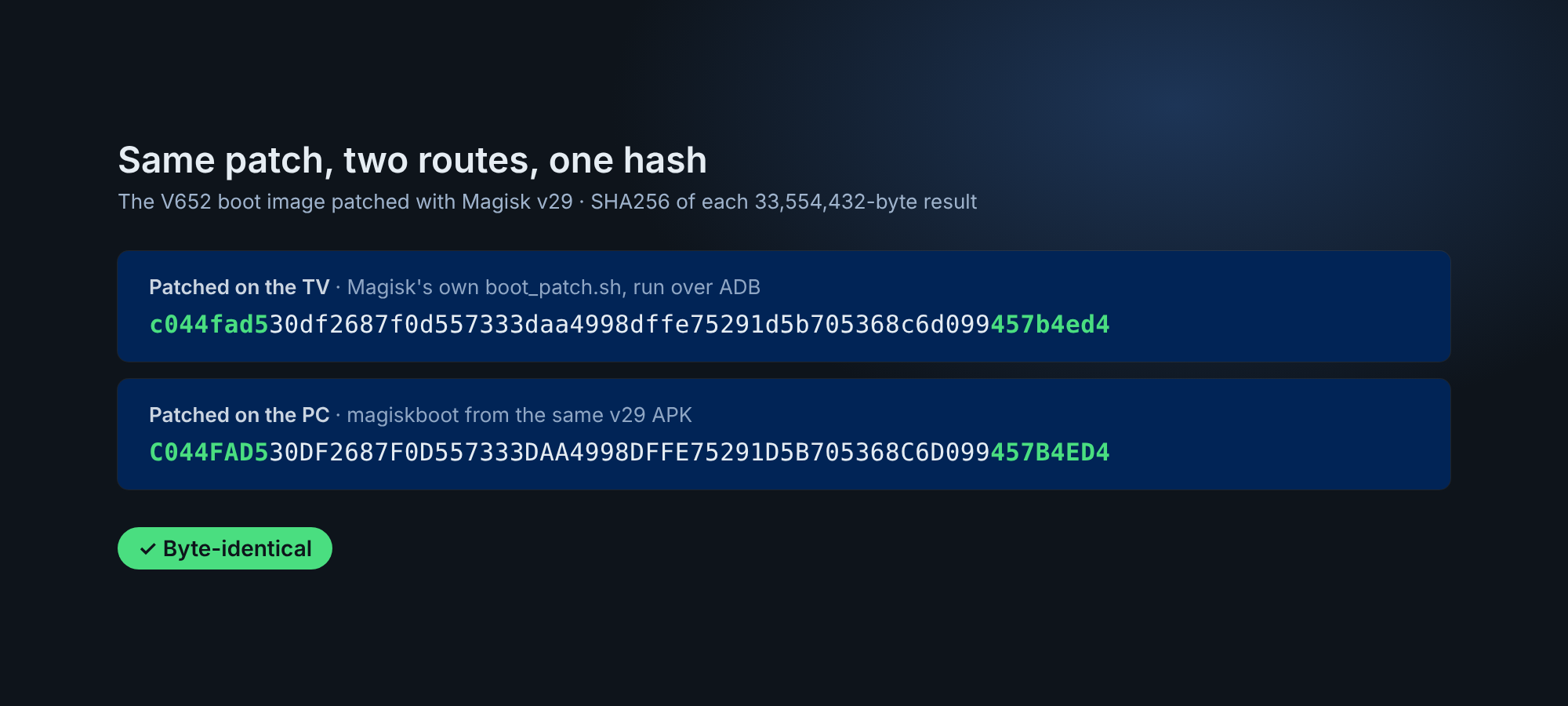
Magisk patching on the TV produced the same boot image bytes as the off-device patch.
That ruled out a difference in how the two patched images were produced. It didn't establish why the rooted image rebooted during fresh setup.
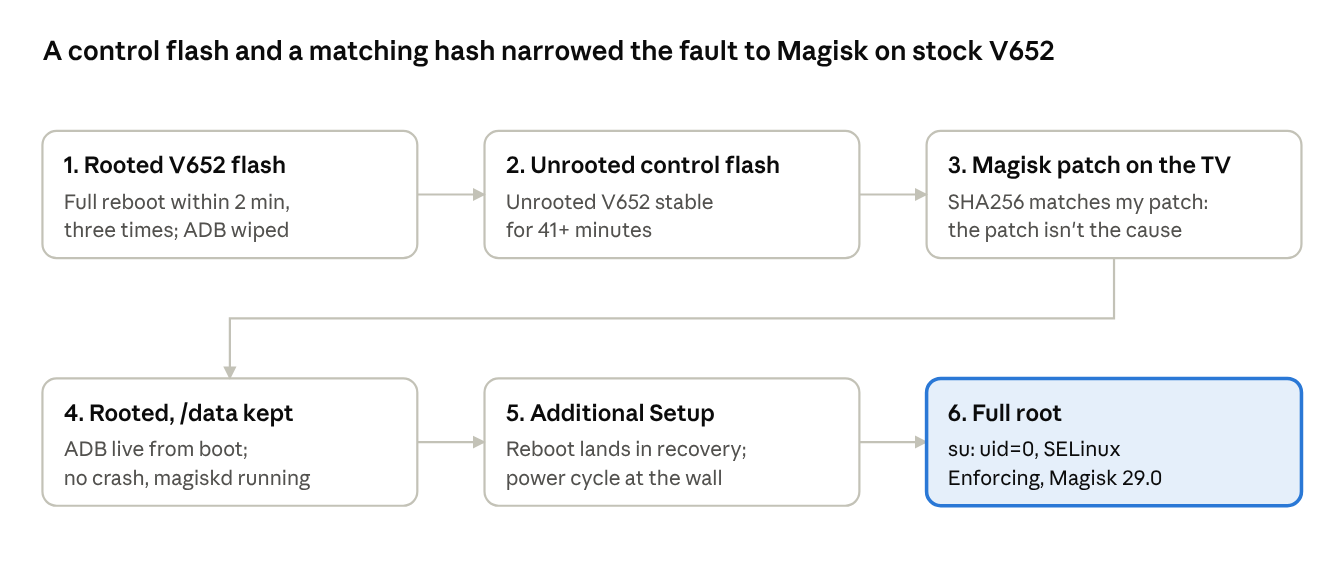
How I narrowed down the reboot problem, one variable at a time.
Each step removed one possible cause, and only the keep-data flash gave me a root shell to work in.
Keeping /data to get logs, then root
To see what was killing the rooted boot, I needed ADB working from the first second. That meant not wiping /data. The installer's config.txt already protects partitions with a skip_upgrade flag, so I set it on the four data lines too:
part = data /data ext4 package7/data.tar.bz2 11264709684 1 0 0
That's one character per line, and the file length doesn't change, so it went into the rooted image with the same in-place swap as the boot image. Before flashing, I started a capture script that waits for ADB, then streams the full system log and a process snapshot every 10 seconds until the connection drops.
The TV booted straight to the Google TV home screen. /data, my setup and the ADB authorisation had all survived. The capture connected 37 seconds after boot, and magiskd was already running. A TCL user-agreement dialog appeared once and I cancelled it.
Then it didn't reboot. The capture also showed com.tcl.guard (TGuard, part 1's prime suspect) running in stock V652 with five boot triggers. But with no crash to catch, I still can't say what killed the first rooted boots. The obvious differences are a fresh /data versus a set-up one, and TCL's agreement dialog accepted versus declined. Neither is proven.
Plain su wasn't there at first, but the full path worked:
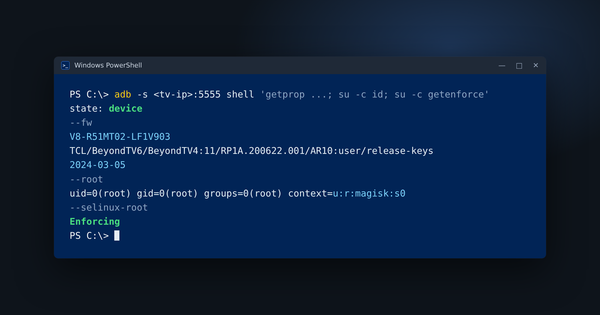
PS> adb -s <tv-ip>:5555 shell /debug_ramdisk/su -c id
uid=0(root) gid=0(root) groups=0(root) context=u:r:magisk:s0
Magisk's own log explained it: "Magisk environment incomplete, abort". That's normal for an image patched off-device. The Magisk app's Additional Setup fixes it, but because of Recovery Mode, its reboot dropped the TV into stock recovery's "No command" screen. That screen doesn't time out. Unplugging at the wall got it back to a normal boot, and then:
PS> adb -s <tv-ip>:5555 shell su -c id
uid=0(root) gid=0(root) groups=0(root) context=u:r:magisk:s0
PS> adb -s <tv-ip>:5555 shell 'su -c ''getenforce; magisk -v; magisk -V'''
Enforcing
29.0:MAGISK:R
29000
That's root on the UK Google TV build, with SELinux still Enforcing. Since then I reboot from the TV's menu or with adb reboot, never from the Magisk app. The install rules suggest the keep-data image could clear a stuck recovery state by rewriting misc while preserving /data, but I haven't tested that as a rescue procedure.
Debloating Google TV: 42 apps hidden, one TCL icon left
I didn't reuse part 1's list. Google TV has different apps, so I started with a read-only audit: every package and where it lives, memory per process, running services, boot receivers, and launcher entries. A few things stood out:
PlayAutoInstallhad installed Tubi, Disney+, Channel 4, My5, ITVX, Netflix and Prime during setup without asking.com.tcl.versionUpdateApp, TCL's updater, was active at boot. A future TCL update could overwrite the rooted firmware.com.tcl.guardregistered five boot receivers, more than any other app.- The TV had about 490 MB available out of 2 GB, with 277 MB already in swap and 304 processes.
The module works the same way as before: an empty .replace file over each app's folder, so Magisk hides it without touching /system or /product. I did it in two phases, so a problem would point to one group.
| Phase | Hidden |
|---|---|
| 1 (33 apps) | TCL updater, telemetry (TCL_ALL_BI), promos, user centre, user agreement, messages, stickers, TCL Home, TGuard, key help, manual, Alexa, T-Solo, media centre, gallery, TCL browser, hearing aid, TCL Channel, TCL keyboard, PlayAutoInstall, Play Movies, Play Games, YouTube Music, calendar sync, feedback, TalkBack, camera, messaging, print spooler, WebView shell, Stan, Rakuten TV |
| 2 (9 more) | TCL assistant, mic manager, Miracast, T-Cast, Google TV phone remote, TCL dashboard, TCL's launcher customiser, the TCL Channel UI and its overlay |
The seven auto-installed streaming apps were removed for my user with pm uninstall --user 0. YouTube stayed. Chromecast stayed because I use it. A verify script confirmed that every target was gone and nothing on the keep list was missing. Gboard took over from TCL's keyboard, and the home screen still resolves to the Google TV launcher.
Two things didn't go to plan:
- Katniss came back. Google's voice and search app has a Play update on top of its system copy.
pm uninstall --user 0reported Success, but it was installed again after a reboot. With the mic manager and TCL assistant hidden, voice no longer works anyway, so I left it. - Not all TCL software can go. Watching an HDMI input runs
com.tcl.tv/.TVActivity, the same activity as the "TV" icon. TCL's input, TV-core, picture-settings, Bluetooth-remote and Game Bar apps are the TV itself. The remote's Settings button turned out to open Google's dashboard, not TCL's Quick Panel, so I hid only the Quick Panel's launcher entry withpm disable. TCL's "TV" icon is the last one on screen.
Memory: about 77 MB less in use, and half the swap. Single readings were useless: my first two pointed in opposite directions, because uptime and what was on screen differed. So I scripted an A/B/A/B test. It cold-boots the TV with the module on (A) or off (B), holds it on the home screen, and records memory at 10, 12 and 14 minutes of uptime. All 12 readings were taken with the home screen in front.
| Run | Debloat | RAM + swap used | Swap used | MemAvailable | TCL processes |
|---|---|---|---|---|---|
| A1 | On | 1,673–1,687 MB | 136–141 MB | 500–512 MB | 6 |
| B1 | Off | 1,741–1,751 MB | 295–296 MB | 593–603 MB | 16 |
| A2 | On | 1,658–1,671 MB | 112–114 MB | 490–502 MB | 5 |
| B2 | Off | 1,746–1,769 MB | 243–244 MB | 522–546 MB | 15 |
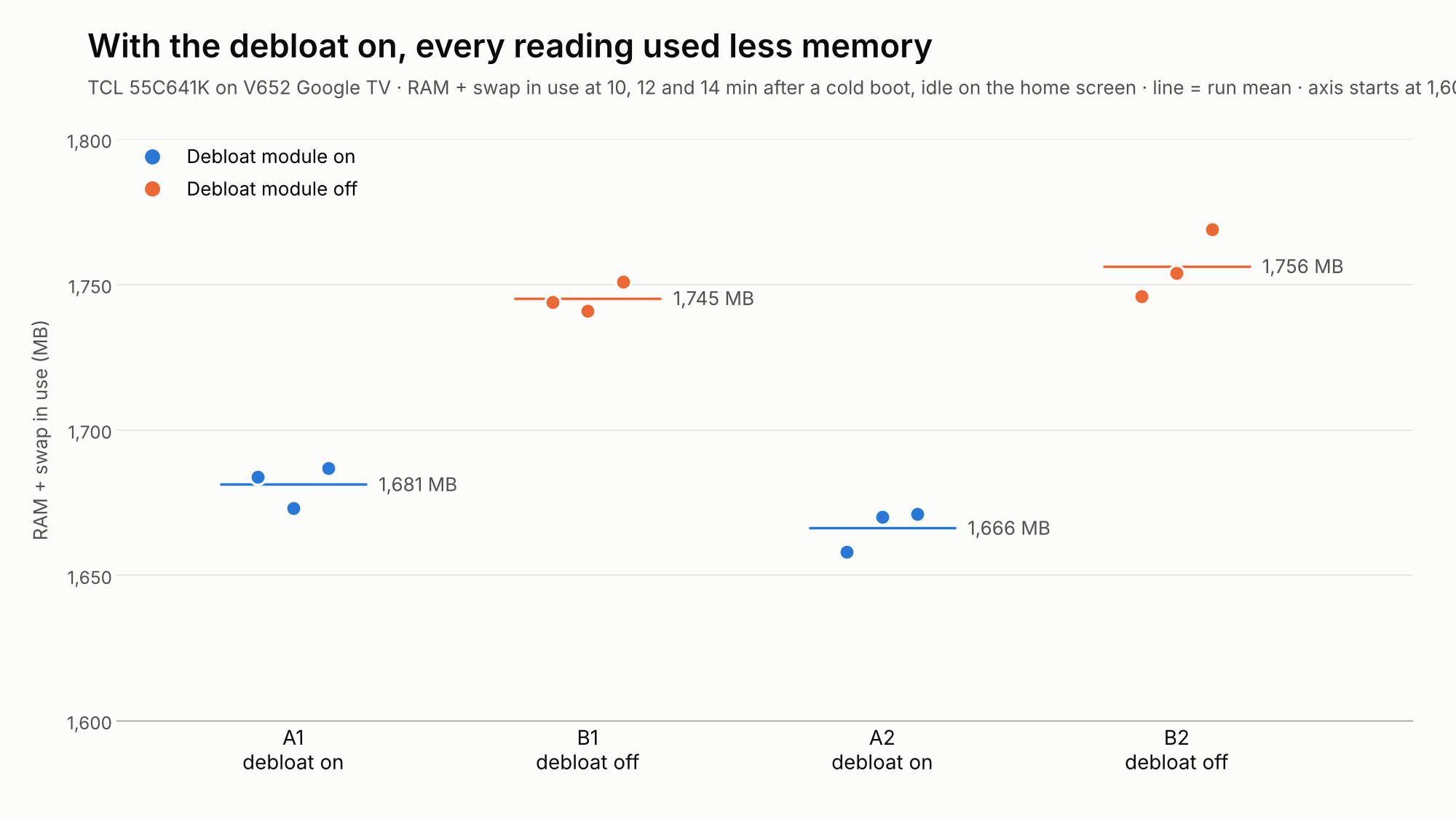
Idle RAM-plus-swap measurements across four cold boots. The vertical axis starts at 1,600 MB.
The ranges for total use don't overlap: a mean of 1,674 MB with the debloat on against 1,751 MB with it off. Swap use more than halves (125 MB against 270 MB on average), and about ten fewer TCL processes run, including telemetry (com.tcl.bi), TGuard and TCL Home.
One trap: MemAvailable looks better with the debloat off (567 MB against 500 MB). That's because the kernel pushed about 145 MB more into zram, which is compressed RAM, not free memory. Judged on MemAvailable alone, the debloat would look harmful. Total process count barely moves (282 against 280), because Android fills spare slots with cached apps either way.
These are idle figures from two boots per side, 10 to 14 minutes after boot. I haven't measured during HDMI playback or app use.
The rest carried over. The tuned picture settings survived both flashes, because they live in the userdata partition the installer skips. Animation scales went back to 0.5, the screensaver was turned off, the inputs were renamed (Nvidia Shield, VM 360, Xbox Series X), and the unused AV input was hidden. Power on to last source, which reverted in part 1, now works: setting it in the menu changed TCL's sita.linein.boot.source from 0 to 11, and a standby on HDMI 2 came back on HDMI 2.
What I verified, and what I didn't
| Verified | How |
|---|---|
| V652 UK build running | ro.build.fingerprint = TCL/G03_4K_GB/BeyondTV4:11/…, patch 2024-12-05 |
| Root with SELinux Enforcing | su -c id → uid=0 … u:r:magisk:s0; getenforce → Enforcing; Magisk 29.0 |
| The patch wasn't the problem | On-device and off-device boot images are byte-identical (SHA256 C044FAD5…) |
| V652 itself runs on this TV | Unrooted image stable through full setup, 41+ minutes |
| HDMI 1 and 2, remote, Home/Input/Settings buttons | Checked by hand after each debloat phase |
| Debloat | Verify script: 0 targets left (except Katniss, which came back), 0 kept apps missing |
| Memory effect (idle) | A/B/A/B test: RAM + swap ranges don't overlap, about 77 MB lower with the debloat |
| Picture settings kept | HDMI 2 Sport read Colour 52, Sharpness 25, Motion clarity Off |
| Power on to last source | Standby on HDMI 2 resumed on HDMI 2 |
Not verified yet:
- Why the first rooted boots rebooted. I have no log of a crash. The rooted boot with
/datakept never crashed. - Memory under load. The A/B/A/B test measured an idle home screen only. HDMI playback and app use weren't measured.
- Dolby Vision, HDR10 from the Shield, Widevine level, Freeview tuning, and Xbox VRR/ALLM on V652. None of these has been tested on the new firmware.
- The project-ID-to-profile mapping. The profile is identical, but I inferred which one my TV loads.
- Long-term stability. A couple of days of use so far.
- The rescue path. The ATV344 Lite image is proven, because I flashed it in part 1. Restoring from it after V652 hasn't been tested.
What I'd take from the project
- Check firmware by its profiles, not its name. "R51MT05" sounded wrong for an R51MT02 TV. The hardware profile, software profile and install rules said otherwise, and I could check all three offline.
- Change one thing to find a fault. The unrooted control flash took 20 minutes and moved the fault from "V652 or root" to "root".
- Hashes beat theories. I'd have spent the night second-guessing my patch settings. One matching SHA256 ended that.
- Make the system keep its evidence. The crashes stayed unexplained because a wipe took ADB with it. Keeping
/datawas what made the problem observable, and it's also what made it go away, which is itself a clue. - Measure like with like. My first memory figures looked like a 70 MB gain, then a 47 MB loss. Both were artefacts of uptime and what was on screen. Only a scripted A/B/A/B test, pinned to the home screen, gave a consistent answer. My first version of that test had quietly measured live TV instead.
- Know what your own scripts do. The next evening, the TV rebooted twice and I went looking for a crash. The boot reasons said
reboot,shell, and the kernel log saidRestarting system with command 'shell'. It was my memory test, doing exactly what I'd written it to do.
If you do this yourself: network ADB plus a permanent Magisk grant for Shell means any authorised PC gets silent root over your network. I'm keeping both while I finish testing. When you're done, set Shell to Prompt or Deny in Magisk, and turn off USB debugging and OEM unlocking.